What is OpenClaw and How is it Different from ChatGPT?
OpenClaw is an AI agent that can operate your computer, officially positioned as a personal AI execution gateway. Unlike tools like ChatGPT, which provide answers or suggestions, OpenClaw can execute tasks based on your commands. For example, if you instruct it to “analyze this sales data, find the city with the lowest profit margin, and generate a report to send via Feishu,” it will read the file, perform calculations, generate charts, write the report, and send it—all without you needing to write a single line of SQL or manually drag charts.
For data analysts dealing with vast amounts of data and repetitive reports, it serves as a 24/7 assistant.
Why Should Data Analysts Pay Attention to OpenClaw?
OpenClaw has been used to analyze supermarket sales data with just a single command, completing the following tasks in minutes:
- Compiled sales data from 45 cities across multiple product categories, totaling 6.64 million yuan in sales and 1.27 million yuan in profit.
- Calculated profit margins for each city and automatically generated a heatmap.
- Identified cities with negative profits, such as Shenyang (-18.3% profit margin) and Chengdu.
- Output visual charts and analysis reports directly into Feishu, all without writing SQL or manually dragging charts, using only natural language.
In investment banking, traditional IPO projects require dozens of analysts weeks to organize prospectuses, legal documents, and financial data. Teams equipped with OpenClaw can compress this process to just a few days, as the system can automatically extract key information.
If you frequently handle repetitive data processing, report generation, or information gathering, OpenClaw is worth trying.
Four Steps to Data Analysis with OpenClaw
Many believe that using AI for data analysis requires coding skills, but OpenClaw simplifies the process into four steps, all conducted through natural language dialogue.
1. Directly Upload Files Without Preprocessing
Open OpenClaw and say: “Read the data analysis case folder and tell me what’s inside.” It will automatically understand the data structure and complete cleaning, organizing, and formatting tasks that would typically take half a day in just seconds.
2. Ask Questions in Business Language
You don’t need to know SQL or Python; just ask questions in business language. For instance, to learn about sales trends, you can ask: “Which month had the highest sales?” OpenClaw will provide analysis results and monthly sales rankings, along with actionable recommendations.
3. Follow Up for Deeper Insights
Don’t just accept the results; continue to probe with questions like “Why?” If it tells you that December had the highest sales, you can ask, “Was it due to promotions or natural growth?” This way, you can deepen your understanding from knowing what happened to why it happened and how to replicate successful strategies.
4. Let AI Discover Issues Proactively
A more advanced use is to instruct the AI to identify business issues that need attention. You might say, “As a business analyst, review this data and tell me the three most pressing issues, ranked by priority.” OpenClaw will generate a prioritized list of issues.
3-Minute Setup: Installation Steps
OpenClaw supports Windows, macOS, and Linux. The installation process is straightforward and can be completed in three steps.
1. Execute the Installation Command
Visit the openclaw.ai website and copy the installation command from the Quick Start section.
- For Windows users: Open PowerShell as an administrator and execute:

- For macOS/Linux users: Open the terminal and execute:

The installation script will automatically detect the system, install dependencies, deploy OpenClaw, and start the configuration guide, taking about 3 minutes.
Note: Before installation, temporarily disable antivirus software like 360 Security, Tencent PC Manager, or Huorong to prevent core files from being mistakenly deleted. The installation path must be in English only.
2. Choose a Large Model and Configure API Key
After installation, the configuration wizard will guide you to select an AI model. Main options include:
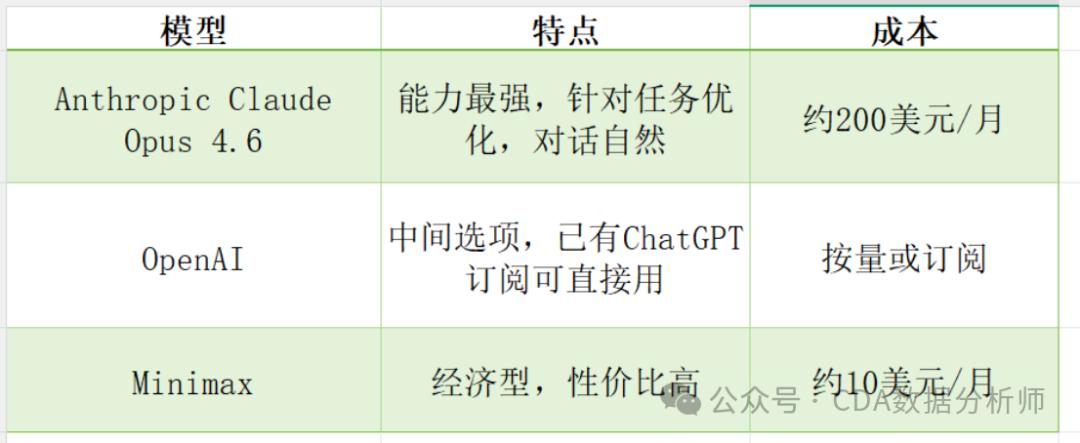
Domestic users can also choose Moonshot AI (Kimi K2.5) and should select the .cn access point. Log in to the Kimi platform to obtain the API Key and paste it into the configuration.
Key Tip: When configuring the API token, paste it into a text editor first to ensure it is in a single line format without line breaks or extra spaces before copying it into OpenClaw. This is a common error.
3. Set Up Messaging Services
One feature of OpenClaw is that you can interact with it through everyday messaging tools like iMessage, Telegram, or Discord, rather than a dedicated website or app. Telegram is recommended for its thread support and chunked display, providing a more human-like conversation experience. The setup process is simple, and OpenClaw will guide you through it.
After configuration, enter openclaw status to check the current status. It’s advisable to try the TUI mode for a quick experience.
If you prefer not to manage environment configurations yourself, platforms like Alibaba Cloud and Tencent Cloud offer one-click deployment images that are user-friendly for beginners.
4. Common Installation Issues Quick Reference
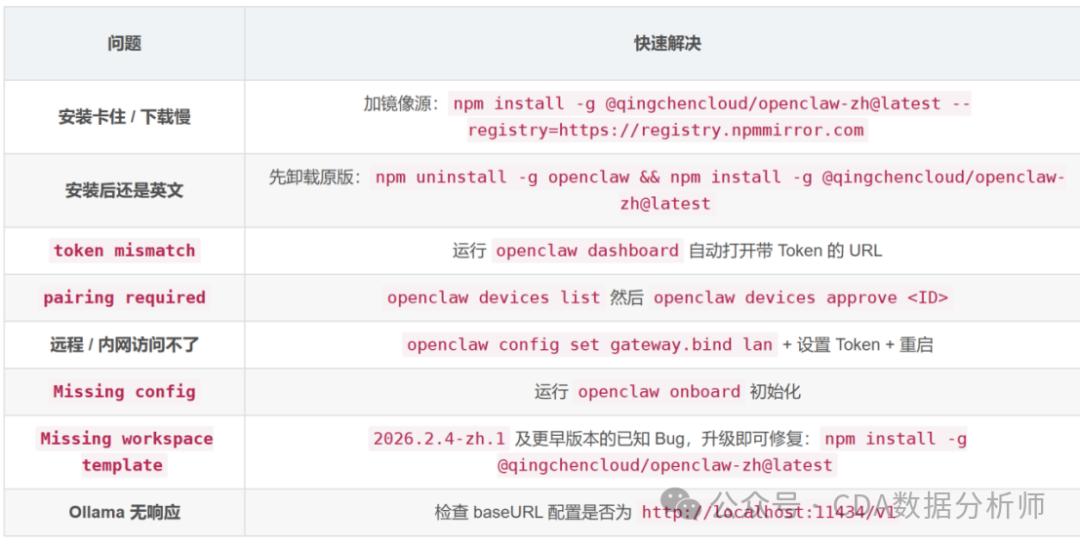
What Can You Do After Installation? 5 Practical Skills Recommended
Many users find that after deploying OpenClaw, it only performs basic chatting and lacks efficiency. This is often due to missing core skills. Here are five skills that I find most useful:
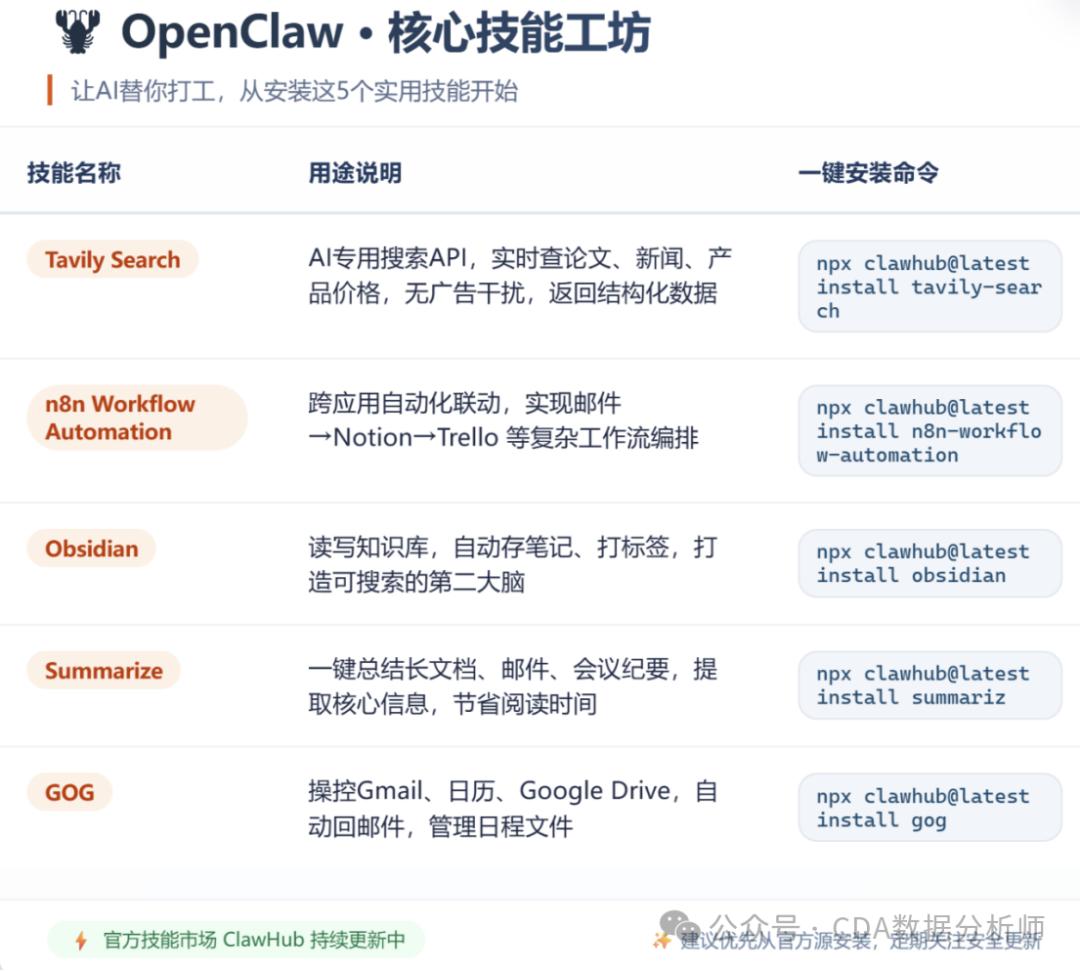
Skill Combinations for Different User Groups
- Office Workers: Install GOG + Summarize + n8n. In the morning, have OpenClaw scan your Gmail, use Summarize to compile all unread emails into a morning report, and trigger auto-replies for important emails with n8n. This can save at least 2-3 hours daily.
- Research or Learning Groups: Install Tavily Search + Obsidian. Tavily helps you quickly find the latest papers and data, while Obsidian turns everything into a searchable, linked personal knowledge base.
Safety Reminders
OpenClaw is powerful, but its ability to control your computer also poses real security risks.
- Risk of Malicious Skill Packs: Third-party skill packs in the community may steal keys or implant backdoors. It’s advisable to download skills from official channels and avoid installing unknown sources.
- Antivirus Software Interference: Temporarily disable antivirus software before installation, and you can re-enable it afterward.
- Public Exposure Risks: As of March 2026, there are 75,200 OpenClaw instances exposed on the public network. It’s recommended not to expose OpenClaw directly to the public network; if remote access is needed, configure secure authentication.
- Known Security Vulnerabilities: A cybersecurity firm in the U.S. reported that over 15,000 OpenClaw instances have remote code execution vulnerabilities, allowing attackers to take control of user machines. A security audit at Shanghai University of Science and Technology showed that OpenClaw’s overall security pass rate was only 58% across 34 standard test cases.
When using, do not let it execute commands you do not understand, avoid exposing instances to the public network, and regularly check for project security updates.
Conclusion
OpenClaw is not just another chatbot; it is an intelligent agent that can genuinely assist you in operating your computer. For data analysts and business professionals, it may be the most worthwhile efficiency tool to try in 2026.
While AI can help us with many data processing tasks, those who truly master AI are individuals with systematic data analysis knowledge. Without understanding data analysis, you may not catch AI hallucinations or errors. Learning more useful data analysis skills can enhance your career, making each professional, clear, and persuasive report a stepping stone for your promotion. The CDA Data Analyst certification is highly regarded, comparable to CPA and CFA, and is recognized widely in the internet industry, where data volume is vast and rapidly evolving. The CDA Data Analyst is highly valued in data positions within the internet industry, often requiring candidates to pass the CDA Level 2 exam, which covers detailed model building content beneficial for data roles.
The CDA Data Analyst certification is favored due to its broad recognition by companies. Many well-known enterprises prioritize CDA holders when hiring data analysts, and companies like China Unicom, Deloitte, and Suning even subsidize employees’ CDA exam fees to encourage them to enhance their data processing and analysis capabilities. This demonstrates that the CDA certification can significantly enhance your competitiveness in the job market, helping you stand out among numerous applicants.
Comments
Discussion is powered by Giscus (GitHub Discussions). Add
repo,repoID,category, andcategoryIDunder[params.comments.giscus]inhugo.tomlusing the values from the Giscus setup tool.